Introduction to C++
A beginner's guide
What is C++?
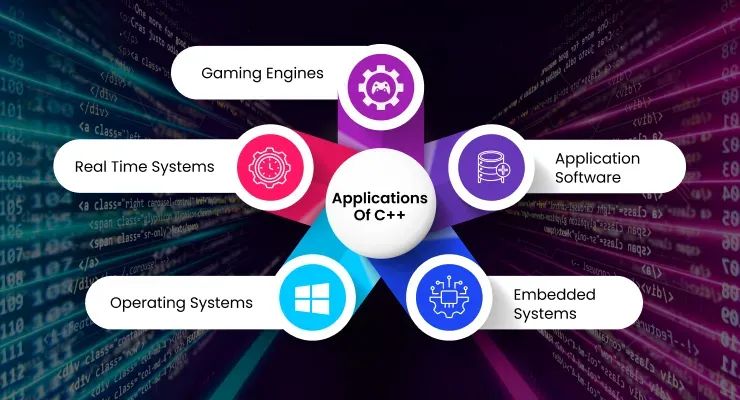
C++ is a powerful, high-performance programming language that is used to create all sorts of applications, from games to operating systems.
Why Learn C++?
- Excellent for performance-critical applications
- Gives you a deep understanding of how computers work
- Widely used in the industry
Setting Up Your Environment
You have a few options for getting started with C++. You can use a desktop IDE like VS Code or an online compiler like Replit.
VS Code
Visual Studio Code is a free, open-source code editor developed by Microsoft. It supports C++ development through extensions.

Replit
Replit is an online IDE that allows you to write and run code in your browser. It's a great option if you don't want to install anything on your computer.

Your First C++ Program
Let's write a simple "Hello, World!" program. This is a classic first program for any new language.
"Hello, World!"
This code will print "Hello, World!" to the console.
#include <iostream>

int main() {
    std::cout << "Hello, World!";
    return 0;
}
Breaking Down the Code
#include <iostream>: Includes the input/output stream library.int main(): The main function where your program starts.std::cout: The standard output stream, used to print text.return 0;: Indicates that the program has executed successfully.
#include <iostream>

int main() {
    std::cout << "Hello, World!";
    return 0;
}
Variables
Variables are containers for storing data values. In C++, you must declare the type of a variable.
Common Data Types
int: for integers (whole numbers)double: for floating-point numbers (numbers with decimals)char: for single charactersstd::string: for textbool: for true/false values
Declaring Variables
Here's how you declare and initialize a variable.
#include <iostream>
#include <string>

int main() {
    int myAge = 25;
    std::cout << "I am " << myAge << " years old.";
    return 0;
}
User Input
You can get user input using std::cin.
std::cin Example
This program asks the user for their age.
#include <iostream>

int main() {
    int age;
    std::cout << "Enter your age: ";
    std::cin >> age;
    std::cout << "You are " << age << " years old.";
    return 0;
}
Understanding the Main Function
The main function is the entry point of every C++ program. It's where the execution of your code begins.
The `main` function
Here is the basic structure of a C++ program with the main function.
int main() {
    // Your code goes here
    return 0;
}
Libraries and Headers
We use #include to bring in pre-written code from libraries. For example, <iostream> is used for input and output.
Including iostream
This is how you include the iostream library.
#include <iostream>Output with `std::cout`
std::cout is used to print text to the console. The << operator is used to send data to the output stream.
Printing Text
Here's an example of how to print a line of text.
#include <iostream>

int main() {
    std::cout << "This is a line of text.";
    return 0;
}
Comments
Comments are used to explain code. They are ignored by the compiler. Single-line comments start with // and multi-line comments start with /* and end with */.
Using Comments
Here is an example of how to use comments in your code.
// This is a single-line comment

/*
This is a
multi-line
comment
*/
Practice Time
Try to write your own "Hello, World!" program and experiment with `std::cout`.
Exercise 2: Personal Greeting
Modify the "Hello, World!" program to do the following:
- Print "Hello, my name is [Your Name]!"
- On a new line, print a fun fact about yourself.
- Hint: Use
std::endlor a secondstd::coutstatement to create a new line.
Solution: Personal Greeting
Here is one way to solve it. Your name and fact will be different!
#include <iostream>

int main() {
    std::cout << "Hello, my name is Alex!" << std::endl;
    std::cout << "I enjoy hiking on weekends.";
    return 0;
}
What is a Variable?
A variable is a named storage location in memory that holds a value. In C++, variables must be declared with a specific data type.
Declaring Variables
To declare a variable, you specify its type, followed by its name, and optionally an initial value.
type variableName = value;
Integer Variables
Integers are whole numbers. The int data type is used to store them.
int myNumber = 42;
int anotherNumber;
anotherNumber = 100;
Floating-Point Variables
Floating-point numbers have a decimal point. The double and float data types are used to store them.
double price = 19.99;
float temperature = 98.6f;
Character Variables
Characters are single letters, symbols, or numbers. The char data type is used to store them. They are enclosed in single quotes.
char grade = 'A';
char initial = 'J';
String Variables
Strings are sequences of characters. The std::string data type is used to store them. They are enclosed in double quotes.
#include <string>

std::string greeting = "Hello, world!";
Boolean Variables
Booleans can have one of two values: true or false. The bool data type is used to store them.
bool isRaining = false;
bool isSunny = true;
Constants
Constants are variables whose values cannot be changed after they are initialized. The const keyword is used to declare a constant.
Declaring Constants
Here's how you declare a constant.
const double PI = 3.14159;Arithmetic Operators
C++ supports the following arithmetic operators:
+(addition)-(subtraction)*(multiplication)/(division)%(modulus)
Using Operators
Here's an example of using arithmetic operators.
int x = 10;
int y = 3;
int sum = x + y;
int difference = x - y;
int product = x * y;
int quotient = x / y;
int remainder = x % y;
User Input with `std::cin`
We can get input from the user and store it in variables using std::cin.
Getting User Input
This program asks the user for two numbers and then prints their sum.
#include <iostream>

int main() {
    int num1, num2;
    std::cout << "Enter two numbers: ";
    std::cin >> num1 >> num2;
    int sum = num1 + num2;
    std::cout << "The sum is: " << sum;
    return 0;
}
Control Flow in C++
Making Decisions in Your Code
What is Control Flow?
Control flow refers to the order in which the statements in your program are executed. By default, code is executed sequentially. Control flow statements allow you to alter this sequence.
The `if` Statement
The if statement allows you to execute a block of code only if a certain condition is true.
`if` Statement Example
This code checks if a number is positive.
#include <iostream>

int main() {
    int number;
    std::cout << "Enter a number: ";
    std::cin >> number;

    if (number > 0) {
        std::cout << "The number is positive.";
    }

    return 0;
}
The `if-else` Statement
The if-else statement allows you to execute one block of code if a condition is true, and another block of code if it is false.
`if-else` Statement Example
This code checks if a number is even or odd.
#include <iostream>

int main() {
    int number;
    std::cout << "Enter a number: ";
    std::cin >> number;

    if (number % 2 == 0) {
        std::cout << "The number is even.";
    } else {
        std::cout << "The number is odd.";
    }

    return 0;
}
The `if-else if-else` Statement
You can chain multiple conditions together using else if.
`if-else if-else` Example
This code checks if a number is positive, negative, or zero.
#include <iostream>

int main() {
    int number;
    std::cout << "Enter a number: ";
    std::cin >> number;

    if (number > 0) {
        std::cout << "The number is positive.";
    } else if (number < 0) {
        std::cout << "The number is negative.";
    } else {
        std::cout << "The number is zero.";
    }

    return 0;
}
The `switch` Statement
The switch statement is a good alternative to long if-else if-else chains when you are checking the value of a single variable.
`switch` Statement Example
This code prints the name of a day of the week based on a number.
#include <iostream>

int main() {
    int day = 4;
    switch (day) {
        case 1:
            std::cout << "Monday";
            break;
        case 2:
            std::cout << "Tuesday";
            break;
        // ... and so on
        default:
            std::cout << "Invalid day";
    }
    return 0;
}
Loops
Loops are used to execute a block of code repeatedly. C++ has three main types of loops: for, while, and do-while.
The `for` Loop
The for loop is used when you know how many times you want to execute a block of code.
`for` Loop Example
This code prints the numbers from 1 to 5.
#include <iostream>

int main() {
    for (int i = 1; i <= 5; ++i) {
        std::cout << i << " ";
    }
    return 0;
}
The `while` Loop
The while loop is used to execute a block of code as long as a condition is true.
`while` Loop Example
This code prints the numbers from 1 to 5.
#include <iostream>

int main() {
    int i = 1;
    while (i <= 5) {
        std::cout << i << " ";
        i++;
    }
    return 0;
}
The `do-while` Loop
The do-while loop is similar to the while loop, but it will always execute the block of code at least once, because the condition is checked at the end of the loop.
`do-while` Loop Example
This code will ask the user to enter a number until they enter a positive one.
#include <iostream>

int main() {
    int number;
    do {
        std::cout << "Enter a positive number: ";
        std::cin >> number;
    } while (number <= 0);
    return 0;
}
Functions
Functions are blocks of code that perform a specific task. They are reusable and help to organize your code.
Defining a Function
To define a function, you specify its return type, name, and parameters.
returnType functionName(parameters) { ... }
Function Example
This function takes two integers as input and returns their sum.
int add(int a, int b) {
    return a + b;
}
Calling a Function
To use a function, you "call" it by its name and provide the required arguments.
Calling a Function Example
This code calls the add function and prints the result.
#include <iostream>

int add(int a, int b) {
    return a + b;
}

int main() {
    int result = add(5, 3);
    std::cout << "The result is: " << result;
    return 0;
}
Function Prototypes
If you define a function after you call it, you need to provide a function prototype at the beginning of your file. A prototype tells the compiler about the function's name, return type, and parameters.
Function Prototype Example
Here's how you would write a prototype for the add function.
#include <iostream>

int add(int a, int b); // Function prototype

int main() {
    int result = add(5, 3);
    std::cout << "The result is: " << result;
    return 0;
}

int add(int a, int b) {
    return a + b;
}
Scope
Scope refers to the region of your code where a variable is accessible. Variables declared inside a function are only accessible within that function (local scope).
Global vs. Local Scope
Variables declared outside of any function have global scope and can be accessed from anywhere in your program.
#include

int globalVar = 100;  // Global variable

void function1() {
    int localVar = 50;  // Local variable
    std::cout << "Global: " << globalVar << std::endl;  // Accessible
    std::cout << "Local: " << localVar << std::endl;    // Accessible
}

void function2() {
    std::cout << "Global: " << globalVar << std::endl;  // Accessible
    // std::cout << localVar << std::endl;  // ERROR! Not accessible
}

int main() {
    function1();
    function2();
    return 0;
}